This is a useful and convenient tool for cutting mp3 file. After some simple steps, you can preview and save the cut file to the phone memory or memory card. In this tool, you can also set music as the ringing tone for phone call or short message. It can help you to make the unusual ringing tone.
Monday, September 19, 2011
Moist House Mp3 Cut v2.6 S60v5 | S^3 Signed
This is a useful and convenient tool for cutting mp3 file. After some simple steps, you can preview and save the cut file to the phone memory or memory card. In this tool, you can also set music as the ringing tone for phone call or short message. It can help you to make the unusual ringing tone.
Sunday, September 18, 2011
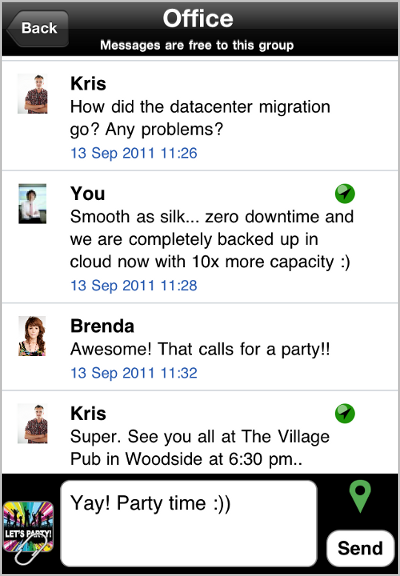
Imsy-Social Messenger v.91 - S60v3, S60v5, S^3 Signed - WhatsApp Killer
Imsy - The fastest, free, group messaging app for your smart phone!
FEATURES
- Send Free Text and Multimedia messages to friends, anywhere in the world.
- Make Groups of friends and start conversing with all, for free.
- Receive free daily alerts of horoscope, Weather, Sports, Stocks, Cartoon strips etc.
- Update Twitter & Facebook Status.
MDVR SymDVR v1.16 S60v3 | S60v5 | S^3 | Signed
Main Features
● Supports continuous video recording
● Delete old records automatically
● Supports zoom in/out during recording
● Can record video in background
● Can record HD Video
● Has Favourites functionality
You can choose or adjust following options:
● Camera (main or secondary)
● Video resolution
● Frame rate
● Audio codec
● Audio and video bitrate
● Size of one video file
● Storage limit
● Disk drive
● Startup mode
● Sound recording\off
● Fixed found bugs
You can choose or adjust following options:
● Camera (main or secondary)
● Video resolution
● Frame rate
● Audio codec
● Audio and video bitrate
● Size of one video file
● Storage limit
● Disk drive
● Startup mode
● Sound recording\off
What's New
● Fixed found bugs
● Added resolution 864х480
● Added video bitrates 12 Mbit and 15 Mbit
● Changed record format for resolution 640x480 - from H263 to H264 (for S^3+)
● Improved inner video player - added subtitles support (for 9.1-9.3 subtitles may flicker, but better than nothing)
Next steps of development
- Bug fixing
- Use accelerometer
- Night shot mode
- GUI improvements
Photo Browser Technologies 2.00(1) S^3 / S^Anna / S^Belle Unsigned retail By POPDA
Browse your photos with stunning 3D effects
Photo Browser is an experimental photo browser that makes your viewing experience fast and fun.
- Intuitive touch UI
- Magnifying glass
- Side Navigation
- Send photo
Change log:
Scanning and thumbnail creation notification
Delete is prevented during the start-up.
Alexander Fokin RndTones v1.1 S60v3 S60v5 S^1 S^3 Anna Belle SymbianOS9.4 Unsigned Retail By DSPDA
The main task of this application is changing the ringtones automatically. It is not secret that one ringtone not always can be set for call, messages and alarm. Often you want to set one long and loud ringtone for the call and short and loud - for messages. For an alarm you want to set the long one but with an increasing tempo. The RndTones application counts this and allows you to set different ringtones lists for the calls, messages and alarms. After each of events (incoming call, incoming message, and alarm action) the new ringtone will be selected randomly from the appropriate list. The application settings are quite compact. “Change ringtones” – switches the application work (including autostart). If “yes” – the ringtones will be changed (for the selected events) and the application starts will automatically when phone starts. If “no” – the ringtones will be not changed and the application will not start with the phone. Further you can switch on or off the ringtones changing for the definite events. In the various alarm applications the alarm ringtone changing is the second function by the popularity after ability to configure the acting intervals, though not every alarm application can do it. And in separation of alarm this function is in general unique! It is small separate server application handles the ringtones changing and it is not consume a lot of system resources and do not reveal self-anyhow. The main application can be closed or minimized directly after configuring the settings. This will not affect further work anyhow. Then we have three separate playlists. They are: Call ringtones, SMS ringtones, Alarm ringtones.
| ||||||||
“Activate” – the cascade menu. You can select “all” or “nothing”. Accordingly you can add all the ringtones into the rotation process or remove them.
“Ringtone information” – the dialogue will be shown that has full ringtone file path (remember that in the list it is only the ringtone’s name). This information is not needed too often and there is no sense to show it in the main list view because it will only burden it. If someone needs to see the file information – he can see it using this menu.
“Sound on/Sound off” – these are interchangeable options. They affect the selected ringtone playing while you navigate through the list. This is so called“preview”. The function can be useful but it can bother you and so you will want to switch it off.
Series60 3rd Edition FP1, Series60 3rd Edition FP2, Series60 5th Edition, Symbian^3 DOWNLOAD |
Subscribe to:
Comments (Atom)


